Network Topology
The lab uses an isolated Proxmox bridge, vmbr100, on 172.16.50.0/24. The Proxmox host sits at 172.16.50.1 and provides outbound NAT so guests can install packages during provisioning.
Host Map
| IP | Hostname | VM ID | Role |
|---|---|---|---|
172.16.50.10 |
ailab-dev |
210 |
Developer workstation |
172.16.50.20 |
ailab-ml |
220 |
ML platform |
172.16.50.30 |
ailab-ds |
230 |
Data science |
172.16.50.40 |
ailab-app |
250 |
Shared AI apps |
172.16.50.50 |
ailab-k8s |
260 |
Kubernetes node (vuln+secure k3s pair) |
172.16.50.60 |
ailab-siem |
270 |
Detection — Elastic Security (persistent) |
172.16.50.99 |
ailab-attack |
240 |
Attack box |
Service Layout
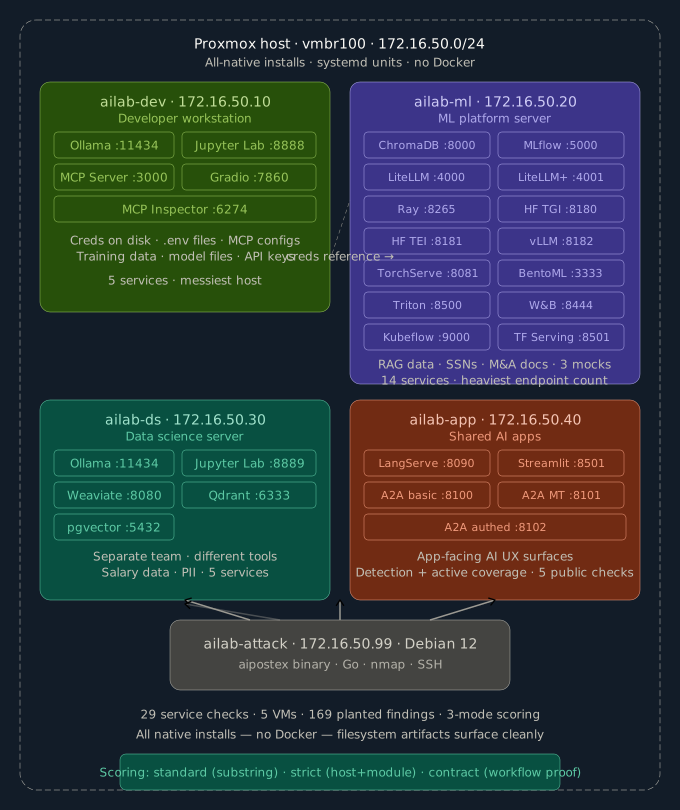
Counts
- 6-VM managed estate (incl. the
ailab-k8snode) — deployed, reset, and snapshotted together - +
ailab-siem, a persistent Elastic detection host outside the reset-wave loop (7 hosts in all) - 5 target VMs
- 62 verification checks (
verify-lab.sh— service health + content validation across the estate and the detection host)
Hostname Resolution
base-setup.sh writes the same /etc/hosts map to every VM, including ailab-app. The attack box SSH aliases also mirror that map, so ssh ailab-dev, ssh ailab-ml, ssh ailab-ds, and ssh ailab-app work out of the box.